Item Workbench for Oracle E-Business Suite
Item workbench combines multiple applications and screens into A single comprehensive workspace.
Use the Oracle inventory workbench to quickly find items and related information.
Control e-business navigation and maintenance through the revolutionary workbench interface.
Reduce the learning curve for new users of the e-business suite.
Very rich looks and feel interface developed on oracle apex
No cost (no license required for oracle apex)
Current Features
Request creation before load items in Oracle
Item description format enabled
Organization assignment
Category assignment
Manufacturing part number definition
Item attachments
Approval mechanism integrated
Support multiple inventory master organization
Upcoming Features
Item attributes across inventory organizations
Quantity on hand across inventory organizations
Customer orders and history
Purchase orders
Purchase history
Purchase requisitions
Supplier quote history
Work in process
Bill of materials with component drill down
Indented bill of material
Router definitions
Item catalog attributes
Engineering change order detail
Customer item cross reference
Order management document attachments
Price lists
Item Workbench Demo
Data Migration Workbench for E-Business Suite
Data Migration Workbench is built to automate data load process by loading the data from a structured flat file using pre-defined or custom data templates. Tool did not violate any Oracle standard and used only Oracle EBS interface tables/APIs to move data into Oracle EBS base tables. It has a facility to define custom data templates and to a plug-in extension for custom business validation and mapping for each column of the conversion. It allows the user to load the data either through a file and online and can correct error data online. It provides user-level security so that authorized user can only run this tool for selected conversion based on their responsibilities.
Sample Screen to see the statistic of loaded data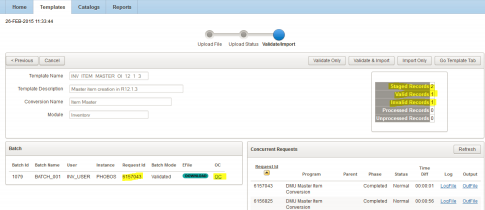
Code Migration Utility for E-Business Suite
Code Migration Utility is to be developed to automate the code migration process by deploying code
from version control repository (SVN, TFS, VSS etc.) to EBS instance. Oracle APEX technology is used to build UI and JAVA/shell web services to connect version controls and migrate code into EBS. It has following facilities
• Facility to connect any target instance for code migration and produces the migration log files to validate log
information.
• Facility to connect different version controls (SVN, TFS, VSS etc.)
• Approval based authorization to allow the privileged user only to run migration in UAT and PROD
• Comment section to track user conversation for each migration request.
Sample Screen to see the dashboard of CMU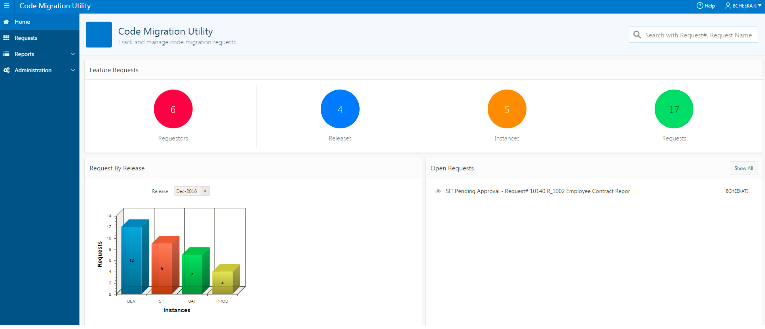
Cloud Fusion Migration Utility for Fusion App
Cloud Fusion Migration Utility is to be developed to automate the data migration process by loading data from legacy systems (csv, xml, JSON, database) to Oracle cloud fusion. Oracle APEX technology is used to build UI and JAVA web services to connect fusion application. It has following facilities
• Facility to connect any target instance for data migration and produces the log files to validate log information.
• validation at staging area prior to import data into Fusion
• custom validation and transformation integrated
